
How to register and maintain a WhatsApp account? Reasons for account bans, unblocking methods and marketing strategies that foreign traders must read
This article has compiled a complete guide to using WhatsApp for foreign trade practitioners, covering WhatsApp download and installation, account registration, account maintenance skills, account ban reasons, account unblocking, WhatsApp Business and API, customer development and marketing methods, etc. At the same time, it combines foreign trade independent stations, CRM and SEO customer acquisition scenarios to help companies use WhatsApp more safely and efficiently for overseas customer communication and business conversion.
1. How to download WhatsApp?
WhatsApp is one of the most widely used instant messaging tools in the world. For foreign trade salesmen, cross-border e-commerce practitioners, overseas sales and B2B companies, WhatsApp can not only be used for daily communication, but also for customer follow-up, order confirmation, after-sales service and customer relationship maintenance.
If you are just starting to do foreign trade, the first step is to correctly download and install the official WhatsApp or WhatsApp Business application.
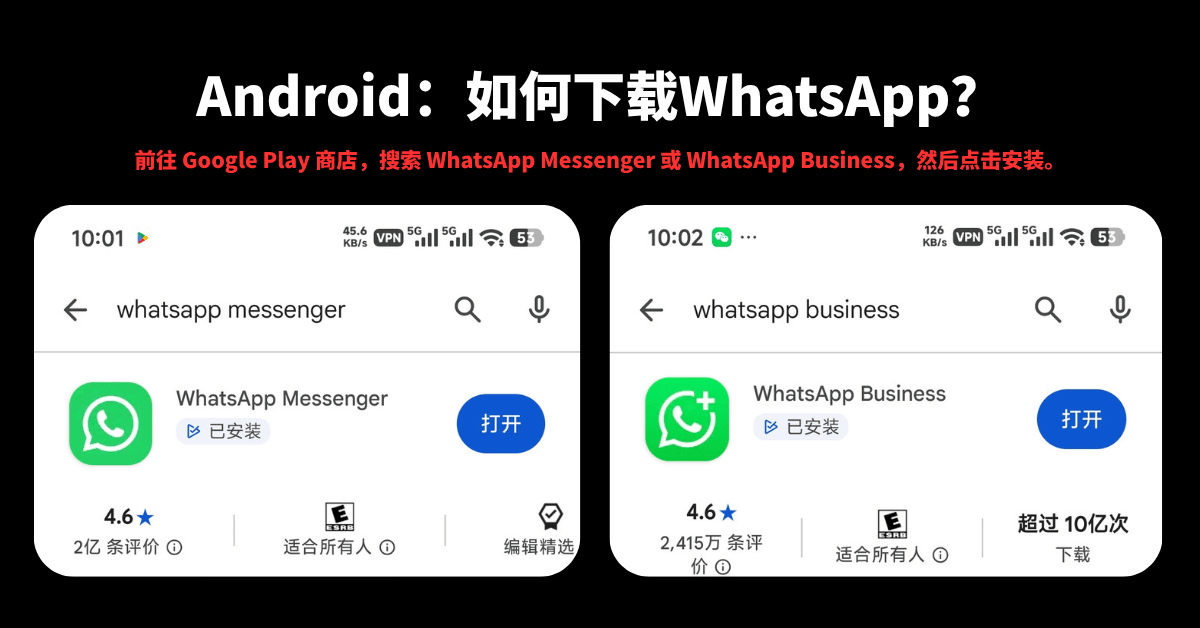
Android: How to download WhatsApp?
-
Go to the Google Play Store, search for WhatsApp Messenger or WhatsApp Business and click Install.
-
Open WhatsApp and agree to the WhatsApp Terms of Service.
-
Register and verify your phone number.
-
If the system detects an available chat history backup and you wish to restore historical chat history, you can follow the prompts to select restore.
-
Enter your name and add a profile photo (optional).
You can also modify your personal information after registration. Just enter the settings page of WhatsApp to modify your name, avatar and other personal information.
It is recommended that foreign trade personnel give priority to using the official WhatsApp application. Do not download so-called "enhanced versions", "cracked versions" or third-party modified versions in order to increase functions.
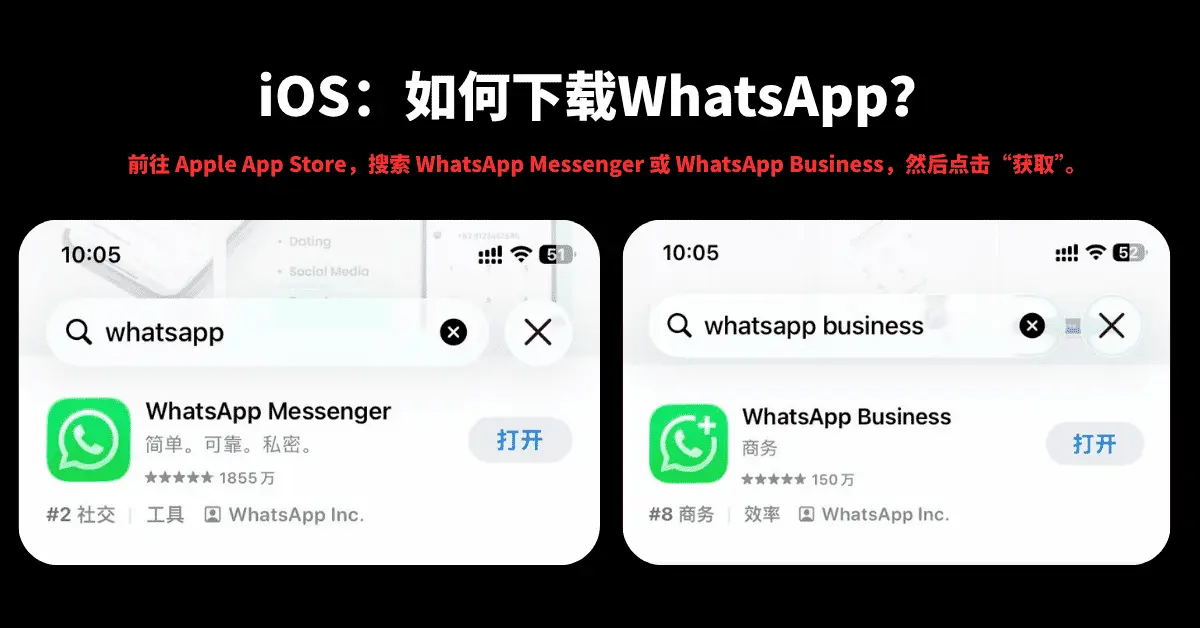
iOS: How to download WhatsApp?
-
Go to the Apple App Store, search for WhatsApp Messenger or WhatsApp Business and click Get.
-
Open WhatsApp and agree to the terms of service.
-
Register and verify your phone number.
-
If there is a chat backup, you can follow the system prompts to restore it.
-
Enter your name and add a profile photo.
WhatsApp officials currently require users to use supported devices and systems and complete account verification with a valid phone number. The official WhatsApp help center also clearly states that you need to be able to receive a verification code via text message or phone call when registering.
What is the difference between WhatsApp Messenger and WhatsApp Business?
For ordinary individual users, WhatsApp Messenger can already meet their daily chat needs.
For foreign trade companies, salesmen, SOHO and cross-border sales personnel, WhatsApp Business is usually more suitable for business scenarios.
WhatsApp Business can help companies build more complete business profiles, such as:
-
Company name
-
Company Profile
-
Business address
-
Business email
-
Corporate website
-
Product or service information
-
Automatic reply
-
Quick reply
-
Tag management, etc.
If your main purpose is to develop overseas customers, maintain customers and handle inquiries, it is recommended to give priority to WhatsApp Business.
2. How to register for WhatsApp?
The core of WhatsApp registration is actually very simple: Prepare a phone number that can receive the verification code normally, and then complete the number verification.
WhatsApp officials currently require users to register with their own phone number, and the number needs to be able to receive text messages or calls. Some number types may not be registered, such as certain VoIP, toll-free numbers, paid premium numbers, etc.
Register via SMS
1. Enter your complete international phone number
Select your country from the drop-down menu and the country code will automatically fill in on the left.
For example:
Mainland China numbers usually need to select:
China +86
Then enter your mobile phone number on the right.
Note:
Do not add an extra "0" to the beginning of your phone number.
For example, if the local number appears as:
13428898969
International formats should usually be entered:
+86 13428898969
Instead of:
+86 013428898969
2. Click Next to request a verification code
WhatsApp usually sends a 6-digit verification code via text message.
If you do not receive the verification code, you can follow the page prompts and wait for the timer to expire before requesting a text message again, or choose phone verification when you meet the conditions.
Do not frequently request verification codes repeatedly, and do not guess verification codes at will.
WhatsApp officially reminds you that entering the verification code incorrectly may result in the temporary inability to continue verification.
3. Enter the 6-digit verification code received via SMS
After entering the correct verification code, the system will continue to complete the account registration.
Verification codes are very important account security information.
Do not tell anyone the WhatsApp verification code, including so-called "customer service", "agents", "unblocking personnel" or other strangers.
WhatsApp officially reminds users not to share the 6-digit registration verification code or account password with others.
4. Add email address
After registration is completed, you can add and verify your email address in the account-related settings according to the setting path of the current WhatsApp version.
The main value of adding an email address is:
-
Enhance account security
-
Help with partial account verification
-
Assisted re-login if conditions are met
-
Help resetting two-step verification information
It should be noted that first-time account registration usually still requires phone number verification via text message or phone call. The email verification code is mainly suitable for re-registering existing accounts that meet the conditions.
Register via voice call
If you cannot receive the SMS verification code normally, you can try phone verification.
-
Select "Voice Call" on the WhatsApp registration page.
-
You will receive an automated voice call from WhatsApp.
-
Answer the call.
-
A unique verification code will be provided via an automated voice.
-
Enter the verification code according to the prompts to complete the registration.
WhatsApp officially still supports receiving verification codes through phone calls.
Register via missed calls
Some Android devices and regions may support number verification through missed calls.
1. Click "Missed Call" on the WhatsApp registration page
A call may be placed to your mobile phone.
Such calls may appear in your call log as missed or rejected calls from unknown numbers, and your phone may not ring noticeably.
2. The system may require WhatsApp to obtain relevant permissions
For example:
-
Manage calls
-
Access call history
These permissions are used to help WhatsApp determine whether the verification call was successfully received.
3. WhatsApp verification completed
When conditions are met, WhatsApp can automatically complete phone number registration based on this verification method.
It should be noted that the official description clearly states that Missed call verification only applies to Android devices.
FAQs when registering for WhatsApp
If you have not received the verification code, you can check:
-
Whether the country/region code is selected correctly
-
Whether the mobile phone number is entered correctly
-
Whether there are too many leading zeros
-
Whether the mobile phone can receive text messages normally
-
Whether the mobile phone can answer calls
-
Is the network connection stable
-
Whether the SMS interception function is turned on
-
Have you installed an application to intercept phone calls
-
Whether verification codes are frequently requested
If the verification code has not been received, it is recommended to wait for the countdown to end before trying other verification methods instead of continuously clicking to obtain the verification code.
3. How to maintain a WhatsApp account?
After many people who are new to foreign trade register for WhatsApp, their first reaction is:
"I want to add customers quickly and start sending letters."
In practice, this approach is not ideal.
When you first start using a new account, it is more important to establish normal and real usage behavior, rather than to contact a large number of strangers in a short period of time.
1. Do not operate frequently within two days after registration
After registering a new account, it is not recommended to immediately:
-
Add a large number of unknown contacts
-
Send a large number of messages in a short time
-
Join a large number of groups
-
Create multiple groups
-
Repost the same content on a large scale
-
Use automated tools to perform batch operations
You can complete the profile settings first and chat normally.
2. Determine the fixed avatar and name
After selecting personal information during registration, do not modify it frequently.
Recommended settings for foreign trade salesmen:
-
Real name or English name
-
Clear professional avatar
-
Company name
-
Position
-
Company Profile
-
Corporate website
For example:
David | Sales Manager | ABC Machinery
In this way, when overseas customers open the chat window, they can quickly know who you are and which company you are from.
3. Reduce initial mass distribution behavior
Don’t send out a large number of identical marketing messages early on.
Your original suggestion was:
Avoid sending a large number of messages in the first 15 days. It is recommended to interact with 5 contacts per day and send more than 20 plain text messages.
This method can be used as a manual operation reference, but do not interpret numbers such as "5 people per day", "20 messages", and "15 days" as the official security thresholds specified by WhatsApp.
WhatsApp does not disclose a "safe sending volume" that applies to all accounts.
Therefore, a more reasonable principle is:
Start with real communication and gradually increase business communication based on customer responses, rather than mechanically pursuing a certain sending quantity.
4. Deal with old user data residue
If you find chat records or messages left by previous users after logging in with a new number, it is not recommended to reply casually.
Especially when you can't confirm:
-
Who is the other party
-
Where does the news come from
-
Who did the number belong to before
-
Whether the other party is willing to continue communicating
Don’t reply in batches just because you see historical messages.
5. Simulate real communication
You can use your existing WhatsApp account to conduct normal and real two-way interaction with your new account.
For example:
-
Send a simple greeting
-
Share product pictures
-
Send work information
-
Conduct normal voice communication
-
Making a normal video call
But please note:
Don’t deliberately create a large number of false interactions just to “grow your account”.
The core of a truly long-term stable account is normal use, rather than deceiving the system through mechanical behavior.
6. Voice and video calls
Normal voice and video calls can be made using WhatsApp.
For example:
-
Communicate with colleagues
-
Communicate with existing customers
-
Communicate with partners
-
Communicate normally with friends
Don’t interpret statements such as “each session must last 5 minutes” and “video calls are easier to maintain an account” as official rules.
Currently, WhatsApp does not disclose a fixed "call length standard for account maintenance."
7. Avoid creating a large number of groups
It is not recommended to create a large number of groups for new accounts in a short period of time, nor to attract unfamiliar users in batches for marketing purposes.
If you really need to create a group, for example:
-
Project
-
Customer Service Group
-
Order communication group
-
After-sales team
You should make sure that group members know the purpose of the group and are willing to participate.
8. Gradually increase the number of friends
After using the account normally for a period of time, you can gradually add contacts.
But compared to simply pursuing "how many people are added every day", what is more important is:
Whether the source of the contact is authentic, whether the customer is willing to communicate, and whether the message content is relevant.
4. What are the reasons for WhatsApp account ban?
WhatsApp accounts are restricted or blocked, usually not due to a single factor.
For foreign trade personnel, the most important thing to pay attention to is not "whether there is a fixed account number", but:
Whether your account exhibits risky behavior such as spam, harassment, fraud, automated or bulk sending.
WhatsApp officials have made it clear that if account activities involve spam, fraud, or endangering user safety, they may be banned.
| Question | Reasons | Solutions/Suggestions |
|---|---|---|
| 1. Reported and blocked by a large number of users | If your account continues to send messages to uninterested users, it may receive a large number of reports or be blocked, thereby increasing the risk of the account. | Avoid sending unwanted messages and reduce ineffective harassment. |
| 2. Send mass messages to non-contacts | Sending highly similar marketing content to a large number of unknown numbers in a short period of time may be identified as spam. | Priority will be given to customers who have business relationships or who take the initiative to leave their contact information. |
| 3. Send malicious files or viruses | The spread of malware, fraudulent links, phishing content, etc. may lead to serious account risks. | Only send files and links that are safe, legal, and business-related. |
| 4. Join multiple groups in a short time | Behaviors such as joining a large number of groups and adding members in batches may exhibit abnormal operating characteristics. | Join groups based on real business needs. |
| 5. Impersonating others or using a false identity | Impersonating an individual, business, or other organization may be against the rules. | Use true and clear personal and business information. |
| 6. Using unauthorized versions of WhatsApp | WhatsApp officially does not recommend using modified versions or unofficial clients. | Use the official WhatsApp app. |
| 7. Obtaining or disseminating personal information without consent | Unauthorized collection, use or dissemination of other people's information may create privacy and compliance risks. | Respect customer privacy and process customer information legally. |
| 8. Violation of Terms of Service | Spam, fraud, harassment, illegal content, etc. may result in account restrictions. | Comply with WhatsApp Terms of Service and related policies. |
| 9. Abnormal network environment | Frequent abnormal logins, device switching or other risk signals may trigger security checks. | Maintain a normal and stable account usage environment, and do not frequently perform abnormal login operations. |
Why are foreign trade development customers particularly prone to risks?
This is the question that many foreign trade salesmen are most concerned about.
For example, a salesperson gets 1,000 overseas customer phone numbers and then uses the same WhatsApp account:
Hi, this is David from XXX Company. We are a professional manufacturer of...
Send 1000 times continuously.
Even if the content itself does not contain illegal information, this behavior may still show obvious characteristics of mass marketing.
A more reasonable approach is:
Precise customer screening → personalized contact → customer response → continuous communication → relationship building → product recommendation → quotation → transaction.
Instead of:
Get 10,000 numbers → Send in bulk with one click → Wait for customers to reply.
WhatsApp account restrictions and bans are not the same thing
Many foreign trade personnel refer to all abnormalities as "account bans". In fact, there may be different types of account restrictions.
For example, WhatsApp officially stated that some accounts may be temporarily restricted if they engage in spam, automated or batch messaging behavior.
While restricted, you may not be able to:
-
Start chatting with new contact
-
Call new contact
-
Create new group
-
Add new group members
-
Use some associated devices
For contacts who have previously established a chat or call relationship, some functions may still be available.
So when you encounter a problem, you must first confirm:
Is it a temporary restriction, account anomaly, or official ban?
5. How to unblock a WhatsApp account after being blocked?
If your WhatsApp account is really blocked, it is not recommended to believe what is said on the Internet:
-
100% unblocked
-
Internal channels unblocked
-
Paid instant solution
-
Unblocking official internal employees
-
Purchase special verification code to unblock
WhatsApp officially stated clearly that third-party services cannot unblock WhatsApp accounts, and only WhatsApp itself can decide whether to unblock the account.
1. Priority will be given to applying through the WhatsApp in-app review
If you open WhatsApp and see something like:
This phone number can't use WhatsApp.
And the page provides:
Request a review
It is recommended to give priority to using the official Request a review function.
The usual operation process is:
-
Open WhatsApp.
-
View account ban prompts.
-
Click "Request a review/Request a review".
-
Submit review instructions as required on the page.
-
Waiting for WhatsApp review results.
WhatsApp officials currently state that most reviews will be completed within 24 hours.
2. What should I write when applying for review?
Don’t write:
Please unban me ASAP!!!
Don't complain at length, either.
Suggestions:
-
Simple explanation that the account is for my own use
-
Indicate that you wish to abide by WhatsApp rules
-
If you think it was blocked by mistake, please state it clearly
-
Request manual review
-
Do not provide false information
You can refer to the following English templates:
Dear WhatsApp Support Team,
I am writing to request a review of my WhatsApp account, which is registered with my phone number.
I believe my account may have been restricted or banned by mistake. I always try to use WhatsApp in accordance with the applicable Terms of Service and policies.
I would appreciate it if you could review my account and let me know whether any action is required from my side.
I understand the importance of complying with WhatsApp's policies and will continue to follow all applicable rules.
Thank you for your time and assistance.
Best regards,
[Name]
3. Contact via WhatsApp official website
If the problem cannot be solved normally within the app, you can find the corresponding contact information and support portal through the WhatsApp official help center.
It should be noted that:
Do not regard an email address circulating on the Internet as a permanently valid "official unblocked email address".
WhatsApp’s support channels and specific processing procedures may change, so the channels currently displayed in the official WhatsApp help center should prevail.
4. Tips for sending emails
As mentioned in your original article:
Best time: Just after U.S. working hours start (around 4 p.m. Beijing time).
This statement is not recommended to be retained as an "official unblocking technique" because WhatsApp has not publicly proven that "it is easier to send an application at a certain time to pass."
A more reasonable approach is:
Content Strategy:
-
Explain the situation honestly
-
Concisely describe the problem
-
Polite request for review
-
Do not submit the exact same application over and over again
-
Don’t threaten customer service
-
Don’t falsify supporting documents
5. Use the correct email address
The email itself is not the core factor that determines the success rate of unblocking.
Compared with statements such as "you must use Gmail" and "you cannot use QQ mailbox", what is more important is:
-
Use the email address you have used normally for a long time
-
Make sure you can send and receive emails normally
-
Provide true information related to the account
-
Submit a request through WhatsApp official support channels
6. Wait patiently
After submitting for review, it is not recommended to send applications repeatedly.
WhatsApp officials have clearly stated that the account ban review status can be viewed within the app, and contacting WhatsApp through other accounts will not speed up the review, nor will it affect the final decision.
Therefore:
Submit a valid application → wait for review → continue processing according to the result
Often more reasonable than submitting repeatedly.
6. What are the advantages of the WhatsApp API interface?
For foreign trade companies, if their business scale gradually expands and they only rely on personal WhatsApp accounts to manage customers, they will often encounter many problems:
-
The number of customers is increasing
-
Multiple salespeople need to jointly manage customers
-
Customer information is easy to miss
-
Unable to manage chat records in a unified manner
-
Unable to conduct systematic customer follow-up
-
The demand for automation is getting higher and higher
This is a good time to learn more about WhatsApp Business Platform.
WhatsApp Business Platform includes capabilities such as WhatsApp Business API and Cloud API provided by Meta, which can help companies integrate WhatsApp into their own CRM, customer service systems, marketing systems or business processes.
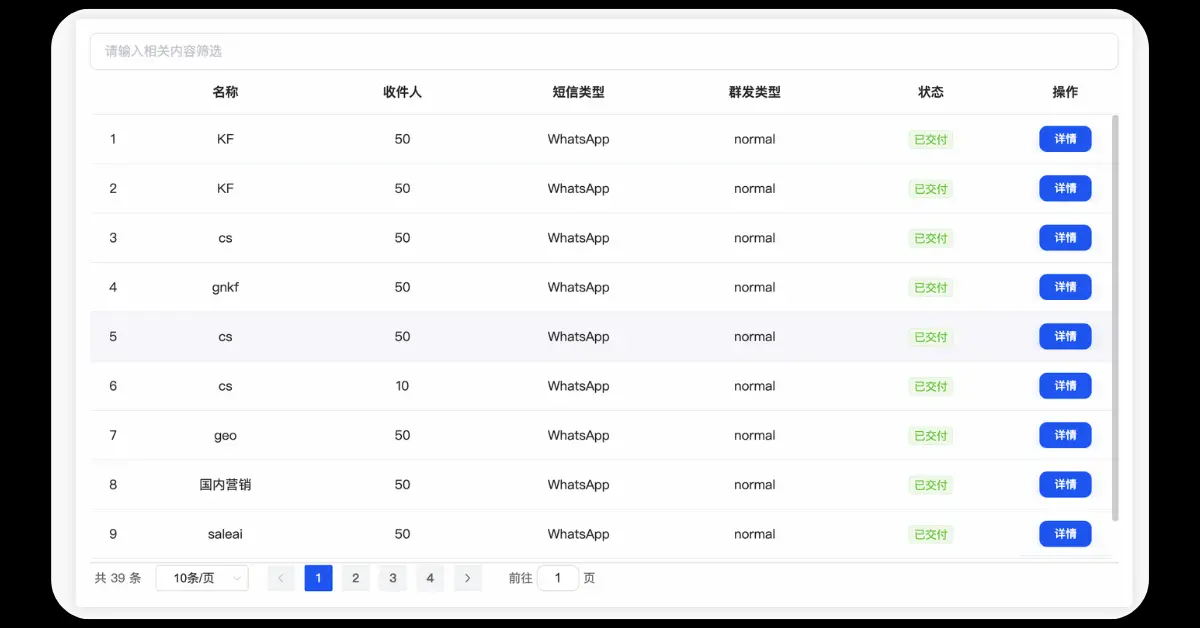
Advantages of the official API interface
1. More suitable for enterprise-level customer communication
API is more suitable for enterprises to connect WhatsApp:
-
CRM
-
Customer service system
-
Work order system
-
Marketing Automation System
Thus forming a more complete customer communication process.
2. Support enterprise-level message management
For businesses with multiple salespeople, WhatsApp messages can be integrated with internal business processes.
For example:
Customer inquiry
↓
WhatsApp automatic reply
↓
Salesman takeover
↓
CRM customer creation
↓
Sales follow-up
↓
Quotation
↓
Order
↓
After-sales
In this way, WhatsApp is no longer just a "chat tool", but can become part of the enterprise's customer management system.
3. Can be combined with automation tools
Enterprises can develop according to actual business needs:
-
Automatic reply
-
Customer assignment
-
Message notification
-
Order reminder
-
After-sales notice
-
AI customer service
-
CRM synchronization
Improving the productivity of business teams.
4. More suitable for multi-person collaboration
Traditional personal accounts are more troublesome when multiple people collaborate.
Enterprise-level solutions can achieve more standardized customer management and team collaboration based on the company's technical architecture and usage methods.
5. More suitable for large-scale operations
The value of APIs will be even more apparent when companies need to handle a large number of customer inquiries every day.
However, special attention is needed:
Using WhatsApp Business Platform/API does not mean that you can send unlimited group messages, nor does it mean that your account will not be blocked.
Businesses still need to comply with the WhatsApp Business Messaging Policy and related terms of service.
Therefore, the API should not be understood as a "method to bypass WhatsApp risk control", but should be understood as:
Officially provided enterprise-grade messaging and customer communication infrastructure.
7. WhatsApp registration and usage suggestions
1. Registration number selection
Your original suggestion was:
Priority is given to using the old accounts of relatives and friends to register. These accounts have been active for a long time and have a low risk of account closure.
It is recommended that foreign trade companies pay special attention to:
WhatsApp accounts should use phone numbers that are legally owned by the company or the actual user and can be controlled for a long time.
Don't buy accounts from unknown sources for the so-called "old accounts" and "high-power accounts".
Because accounts ultimately still rely on phone numbers for authentication.
If the account number is withdrawn, deactivated, or unable to receive verification codes by the original holder, serious account management problems may occur in the future.
WhatsApp officially requires that the registered phone number belongs to the user and needs to be able to receive verification codes.
Also:
-
Ensure that the number is available for a long time
-
Make sure the SIM card can receive text messages and calls normally
-
Maintain a stable network environment
-
Do not frequently perform abnormal device switching
-
Enable account security
2. Division of work between primary and secondary numbers
The foreign trade team can divide accounts according to actual business needs.
For example:
Main number:
Responsible for:
-
Core customers
-
Old customers
-
Large customer negotiation
-
Quotation
-
Order communication
-
After-sales service
Business Development Number:
Responsible for:
-
New customer communication
-
Inquiry follow-up
-
Market development
-
Exhibition customer follow-up
-
Website inquiry follow-up
But please note:
The secondary account cannot become a "spam mass sending account".
Otherwise, once you send a large number of unwanted messages, you may still face account restrictions.
3. Account management skills
Adding friends every day should not be simply understood as a fixed number of "5 people" or "10 people."
More importantly:
-
The source of the contact is authentic
-
The contact is related to the business
-
Customers are willing to communicate
-
Information is targeted
-
No indiscriminate mass sending
It is recommended to classify customers according to their sources:
-
Website
-
Google
-
Exhibition
-
LinkedIn
-
Facebook
-
Referral
-
Existing Customer
This will make it more convenient to follow up with customers later.
4. Make customer notes
Don't just save a phone number.
Suggested records:
Customer name + company + country + product + source + follow-up status
For example:
John / ABC Import / USA / Monitor Arm / Website / Quotation Sent
This can prevent the salesperson from being unable to determine the identity of the customer when facing a large number of WhatsApp contacts.
8. How to improve the effectiveness of WhatsApp marketing?
As an important communication tool for foreign traders, the real value of WhatsApp is not “how many messages are sent”, but:
Send it to the right people and get them to respond.
Therefore, WhatsApp marketing should gradually shift from "bulk thinking" to "customer relationship operations".
1. Automated mass messaging
Enterprises can use compliant WhatsApp Business solutions based on their business needs.
For example:
-
New product notification
-
Order notification
-
Customer Service
-
Event reminder
-
Appointment reminder
-
After-sales notice
If marketing messages are involved, special attention should be paid to customer authorization, message relevance, and platform policy requirements.
Don’t put:
Automation
Equivalent to:
Unlimited group sending.
2. Intelligent interactive reply
If the enterprise accesses AI capabilities, it can help salespeople process quickly:
-
Product parameters
-
MOQ
-
Delivery
-
Packaging
-
Payment
-
Transportation methods
-
Product recommendations
-
Common after-sales issues
For example, customer inquiry:
What's the MOQ for this product?
AI can first give a standard answer based on the enterprise knowledge base, and then the salesperson can make final confirmation.
This can reduce the time salespeople spend answering the same questions repeatedly.
3. Real-time data tracking
If WhatsApp is integrated with a CRM or marketing system, further analysis can be done:
-
Customer sources
-
Message sending status
-
Response
-
Customer follow-up stage
-
Opportunity status
-
Quotation status
-
Transaction status
For B2B companies, what is really important is not simply looking at “how many messages are sent”, but how many are ultimately generated:
Active Customer → MQL → SQL → RFQ → Quote → Order.
4. WhatsApp account protection
Enterprises should establish a complete account security system.
Includes:
-
Use the official WhatsApp app
-
Do not use third-party modified versions
-
Do not purchase accounts from unknown sources
-
Do not share verification code
-
Turn on two-step verification
-
Protect login devices
-
Regularly check associated devices
-
Control the pace of new customer development
-
Avoid spam
-
Avoid scams and phishing content
-
Standardize management of customer data
5.WhatsApp + independent website
For foreign trade companies, it is best not to have WhatsApp exist independently.
You can combine WhatsApp with a standalone website.
For example:
Google Search
↓
Independent website product page
↓
WhatsApp consultation button
↓
WhatsApp instant communication
↓
Salesperson confirms requirements
↓
Send Quote
↓
RFQ
↓
Order completed
This model is more suitable for B2B foreign trade companies than simply looking for a large number of unfamiliar numbers on WhatsApp.
6. WhatsApp + SEO
If the company itself has an independent website, it can also continue to obtain overseas natural traffic through SEO.
For example:
Google search:
car AC compressor manufacturer
↓
Enter the company's official website
↓
View products
↓
Understand the company’s strength
↓
Click on WhatsApp
↓
Contact the salesperson directly
At this time, WhatsApp is responsible for conversion and customer communication tools, while Google SEO is responsible for obtaining accurate natural traffic.
After combining the two, they can form:
SEO customer acquisition → Independent website undertaking → WhatsApp conversion → CRM follow-up → RFQ → Transaction
9. When foreign trade uses WhatsApp to develop customers, how to avoid becoming "harassing marketing"?
The biggest problem for many foreign trade salesmen is not that they don’t know how to use WhatsApp, but:
Sell immediately.
For example:
Hello, we are a professional manufacturer from China.
We have many products.
Are you interested?
If you receive dozens of similar messages a day, most buyers will simply ignore them.
A better approach is to build a simple customer communication logic.
Step one: Confirm customer identity
For example:
Hi John, this is David from ABC Machinery. We connected through your website inquiry.
Let customers know:
Why did you contact him.
Step 2: Confirm customer needs
For example:
I noticed that you're looking for industrial equipment.May I know which model you're currently sourcing?
Step 3: Provide valuable information
For example:
-
Product Catalog
-
Parameter table
-
Product pictures
-
Video
-
Certification
-
Case
-
MOQ
-
Delivery
-
Quotation
Step 4: Make another sale
Don’t just keep sending:
Price?
Price?
Price?
But you should first understand the customer:
-
What product to use
-
Annual purchase volume
-
Target market
-
Product requirements
-
Certification requirements
-
Packaging requirements
-
Delivery requirements
In this way, WhatsApp can truly unleash the value of B2B sales.
10. WhatsApp foreign trade customer development vocabulary reference
Scenario 1: Website inquiry customer
Hi John, this is David from ABC Machinery. Thanks for your inquiry on our website regarding the XXX machine.
I’d like to learn a little more about your application so that I can recommend the right model for you.
Could you please let me know your required capacity and target market?
Scenario 2: Exhibition customers
Hi John, this is David from ABC Machinery. It was nice meeting you at the exhibition.
You mentioned that you were looking for XXX products for your market.
I’m sending you our latest product information for reference. Please let me know if you would like me to prepare a quotation.
Scenario 3: The customer does not reply for a long time
Do not send continuously:
Hi
Hello
Any update?
Please check
Waiting for your reply.
You can use a more natural approach:
Hi John, just following up on the quotation I sent earlier.
If the project is still under consideration, I will be happy to update specs or pricing based on your current needs.
Scenario 4: Follow up with old customers
Hi John, hope everything goes well.
We recently updated this product with new specifications that may be more suitable for your market.
If you are interested, I can send you the latest product details.
11. WhatsApp account security checklist
If you are a foreign trade salesperson, you can check the following items regularly:
Account security
-
Use official WhatsApp
-
Use a number legally owned by you or your company
-
Do not share 6-digit verification code
-
Turn on two-step verification
-
Add and verify email
-
Check associated devices regularly
-
Do not use accounts from unknown sources
Customer development
-
The source of the customer is authentic
-
Customer and business related
-
Avoid indiscriminate mass sending
-
Do not send malicious links
-
Do not send suspicious files
-
Do not impersonate other companies
-
Respect customer privacy
-
Adjust communication frequency based on customer responses
Business operations
-
Establish a CRM customer management system
-
Label customers
-
Record customer source
-
Record inquiry content
-
Record quotation status
-
Record customer follow-up status
-
Regularly count RFQs and orders brought by WhatsApp
12. What should you do if WhatsApp is restricted?
If present:
Your account is restricted right now.
Or:
Your account may be restricted soon.
First of all, don’t panic.
WhatsApp officially stated that some account restrictions will be automatically lifted after the specified time. While restricted, the account may not be able to start chatting with new contacts, create groups, add members, or use some associated devices.
At this time you should:
-
Stop developing customers frequently.
-
Do not continue sending messages in bulk.
-
Don't keep adding unknown contacts.
-
Do not use third-party modified versions of clients.
-
Wait for the limit time to expire.
-
Check recent account usage behavior.
-
Reduce the frequency of abnormal operations in the future.
If it is officially banned and the page appears:
Request a review
You can submit it for official review according to the previous method.
If it is clear that there is no review entry for the page, it means that WhatsApp may have determined that the ban is final.
13. What should WhatsApp foreign trade marketing really focus on?
For foreign trade companies, WhatsApp is not a simple “mass messaging tool”.
What really deserves attention is:
1. Customer quality
100 accurate customers are often more valuable than 10,000 unknown numbers.
2. Response rate
Whether the customer is willing to reply is more important than simply the number of messages sent.
3. Valid Inquiry
The final decision is:
How many effective inquiries does WhatsApp bring?
4. RFQ quantity
If the company's business model is B2B, then you can focus on tracking:
WhatsApp → MQL → RFQ
5.Transaction amount
Eventually we have to return to:
WhatsApp → Customers → Quotes → Orders → Revenue
Only in this way can we truly judge whether WhatsApp marketing is effective.
14. Summary: How should foreign traders use WhatsApp correctly?
For those who are just starting out in foreign trade, WhatsApp registration itself is not complicated.
The real difficulty is:
How to use it in a long-term, safe and stable manner after registration.
From registering an account, completing information, to normal communication, to customer development and enterprise-level marketing, every step should follow a core principle:
Use normally, communicate truthfully, respect customers, and abide by platform rules.
Don’t think of WhatsApp as a simple group messaging tool.
Especially when doing B2B foreign trade, the truly valuable customer development method should be:
Google SEO / independent website customer acquisition
↓
Customer proactive consultation
↓
WhatsApp accepts inquiries
↓
In-depth communication with sales staff
↓
Product Recommendations
↓
Quotation
↓
RFQ
↓
Order completed
If the number of corporate customers further grows, you can consider integrating WhatsApp Business Platform with CRM, AI customer service, marketing automation and internal corporate systems to improve customer management and sales efficiency.
At the same time, it is important to note that no WhatsApp marketing tool or API can replace compliant customer communication. The official platform will also restrict behaviors such as spam, fraud, automated or batch messages, so companies should focus on accurate customer acquisition, customer authorization, personalized communication and long-term customer relationship maintenance.
I hope this article can help friends who are just starting out in foreign trade solve problems such as WhatsApp registration, usage, account security, account closure, and customer development.
If you encounter problems such as failure to receive verification codes, account restrictions, account closures, customer development, WhatsApp Business, WhatsApp API or corporate marketing while using WhatsApp, you can also further troubleshoot specific problems.
For foreign trade companies, the real value of WhatsApp is not “how many messages are sent”, but:Finding the right customers, establishing effective communication, and ultimately converting communication into real inquiries and orders.
Want WhatsApp to truly become your foreign trade customer acquisition tool?
WhatsApp is not only a tool for foreign trade salesmen to communicate with overseas customers, it can also become an important channel for companies to connect with customers, follow up on inquiries and improve conversion rates.
If your company is facing problems such as WhatsApp account registration, account maintenance, account closure, customer development, batch communication, WhatsApp Business or API applications, relying solely on manual operations is often difficult to meet long-term business growth needs.
By combining WhatsApp with independent websites, SEO, CRM and automated marketing systems, it can help companies establish a more complete customer acquisition and conversion process from overseas traffic acquisition, customer communication to inquiry follow-up.
If you want to use WhatsApp to develop more overseas customers and improve inquiry conversion efficiency, you are welcome to contact SeekClue to get a WhatsApp marketing solution that suits your business model.